
# SecureBit.chat
**End-to-end encrypted, peer-to-peer chat that runs entirely in your browser.**
No accounts. No servers storing your messages. No installation required.
[](LICENSE)
[](CHANGELOG.md)
[](#install-as-an-app)
[](#security-model)
[](#forward-secrecy)
[Features](#features) · [How it works](#how-it-works) · [Security](#security-model) · [Quick start](#quick-start) · [Documentation](#documentation)
---
SecureBit.chat is a browser-based, peer-to-peer messenger built on **WebRTC** and the **Web Crypto API**. Two people establish a direct, end-to-end encrypted channel and verify each other in person. There is no registration, no central server relaying or storing messages, and no account whose metadata can leak. Everything cryptographic happens locally in the two browsers.
It is designed for people who need a small, auditable, zero-infrastructure way to talk privately: journalists and sources, security researchers, or anyone who simply wants a conversation that leaves nothing behind.
## Screenshots
| Open a secure channel | Encrypted conversation |
| :---: | :---: |
| 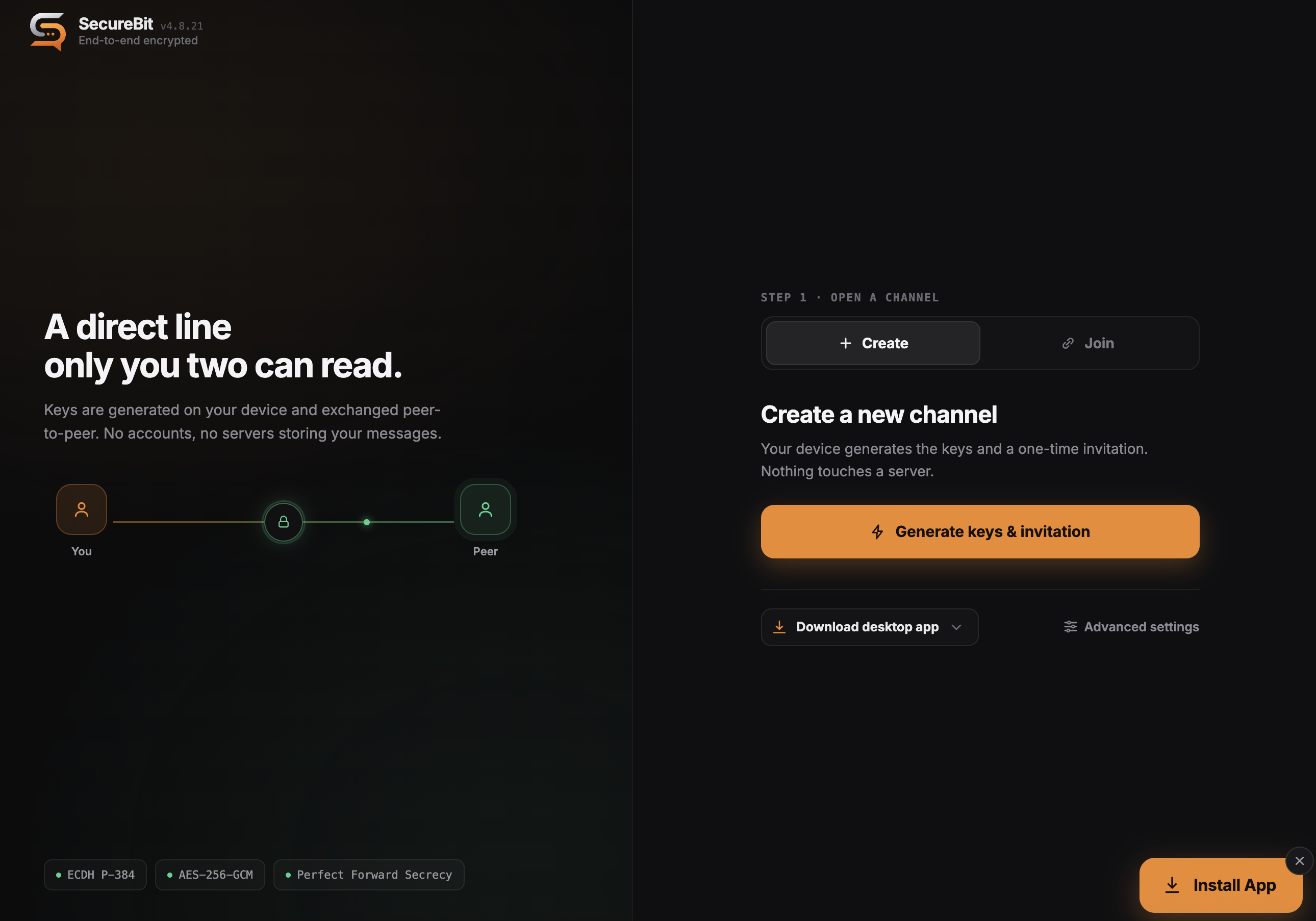 | 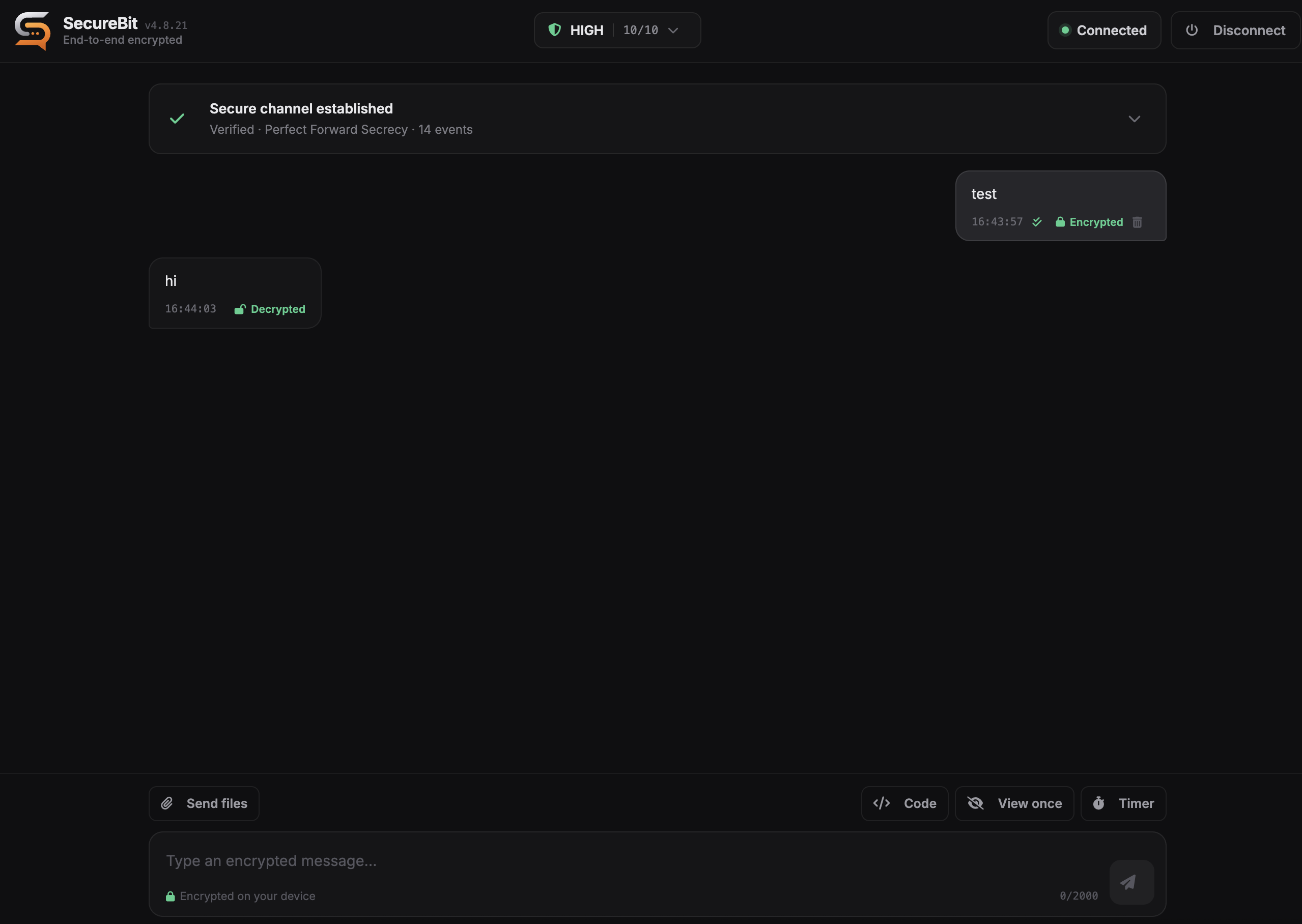 |
## Features
**Encryption and verification**
- ECDH P-384 key agreement with derived per-session keys, AES-256-GCM payloads, and DTLS-protected transport.
- **Double Ratchet forward secrecy.** Every message is encrypted with its own key, and the session re-keys itself each time the conversation changes direction. See [Forward secrecy](#forward-secrecy).
- Interactive **safety code** verification. You confirm a short code out of band before the session is trusted, which is what defeats a man in the middle.
- Replay protection, message integrity (HMAC), and a live security report you can open at any time during a call.
**Privacy by design**
- Direct peer-to-peer connection. Messages never touch a SecureBit server.
- No accounts, no phone numbers, no message history on disk.
- Optional **relay-only mode** routes traffic through your own TURN server so your IP is never exposed to the peer.
- Local key metadata is stored encrypted in IndexedDB; disconnecting cleans up session state.
**Encrypted calls**
- **One-to-one voice and video calls** over the same verified connection. Media rides the verified DTLS-SRTP transport, so calls inherit the session's end-to-end encryption and never traverse a SecureBit server.
- **Adaptive audio**: Opus with in-band FEC, DTX and RED redundancy for intelligible speech at 15 to 20 percent packet loss; audio is prioritised and never throttled by the network controller.
- **Adaptive video**: VP9/AV1 single-encoding SVC (H.264/VP8 fallback) that degrades by spatial/temporal layer, with a runtime controller that trims video bitrate on loss/RTT and recovers as the link clears.
- **Live connection-quality indicator** (Excellent, Good, Fair, Weak) shown during a call, plus in-call mute and video controls.
**Messaging**
- **Encrypted voice messages.** Record in the browser and send over the same end-to-end encrypted transfer channel as files. Audio is captured as PCM/WAV, integrity-protected by a signed hash, and played back inline on the recipient's device without ever touching disk.
- Code blocks with syntax highlighting and an auto-clearing copy button.
- View-once and disappearing messages with countdown timers.
- Unsend (delete for everyone) over the authenticated control channel.
- Delivery status (sending, sent, delivered) with offline store-and-forward.
**Multiple conversations**
- Run several independent chats at the same time. Every conversation gets its own encrypted session, keys and verification, so two chats can never mix.
- A side panel lists your open chats with unread badges. Switching is instant, and starting a new chat leaves the others connected.
- Set your availability (Available, Away, Busy or Invisible) and connected peers can see it. You can also give each chat a private label that is stored only on your device and is never sent to the other side.
**File transfer**
- Consent-gated, end-to-end encrypted transfers with resumable, per-chunk progress.
- Strict file-type allowlist; executable and scriptable formats are rejected.
**Progressive Web App**
- Installable on desktop and mobile, works offline, and ships update notifications.
## How it works
SecureBit never sees your conversation. A session is built directly between the two browsers:
```
Peer A Peer B
| |
| 1. invitation |
|.................................> | carried by QR, link or paste
| |
| 2. response |
| <.................................|
| |
| 3. both read the same safety code
| and compare it out loud |
| |
| 4. both confirm, session verified
| |
|===== end-to-end encrypted ========|
```
1. **Peer A** creates an invitation, shareable as a QR code, a link or plain text.
2. **Peer B** opens it and returns a response the same way.
3. Both sides now show the same **safety code**. Compare it over something an attacker cannot impersonate: in person, or a voice you recognise.
4. The chat unlocks only after both people confirm the matching code. Three incorrect attempts end the session.
Step 3 is not a formality. Completing the key exchange proves that someone completed it, not who. Anyone able to intercept and rewrite the invitation can do that with both of you at once, and comparing the code is what catches it.
## Security model
| Layer | Mechanism |
| --- | --- |
| Key agreement | ECDH (P-384), per-session derived keys |
| Forward secrecy | Double Ratchet: per-message keys, re-keyed on each reply |
| Transport | WebRTC data channel over DTLS |
| Message encryption | AES-256-GCM, end-to-end |
| Authentication | Interactive safety code bound to both peers' DTLS fingerprints |
| Integrity | HMAC + replay protection |
| Sanitization | DOMPurify text-only rendering boundary |
| Local storage | Encrypted key metadata in IndexedDB |
A session is **not** treated as verified until both peers complete the safety code comparison. This is the step that protects you against a man-in-the-middle: the code must be compared through a channel an attacker cannot impersonate. Until it is completed, the session will not act on control messages from the peer.
### Forward secrecy
Message protection does not rest on the keys agreed during the handshake. On top of them SecureBit runs the **Double Ratchet**, the design used by Signal:
- **Every message gets its own key.** It is derived from a chain key through a one-way function and discarded as soon as the message is encrypted or read, so keys held now cannot reconstruct earlier ones. Recovering the live state of a session does not expose what was said before.
- **Each change of direction re-keys the session.** Every reply introduces a fresh ECDH key pair and mixes a new shared secret into the root key, so the conversation continuously moves away from any state an attacker may have captured.
- **Out-of-order messages are handled within fixed bounds.** Keys are held for messages that have not arrived yet, capped at 512 per chain and 1024 in total and expiring after five minutes, with a limit on how far ahead a message may claim to be.
The ratchet is negotiated during the handshake and used when both peers support it. If one side is on an older release, the session falls back to per-session keys and the security panel reports which of the two is actually in use. It shows the state of your connection, not the capabilities of your client.
> [!WARNING]
> SecureBit.chat is privacy software, not a guarantee. View-once and disappearing messages are cooperative (not screenshot-proof), and a TURN relay can observe both peers' addresses and traffic timing, though never message contents. See [`doc/USE-POLICY.md`](doc/USE-POLICY.md).
## Quick start
### Run locally
```bash
npm install
npm run build
npm run serve
```
Open the printed local URL in two browser windows or profiles, then:
1. Create an offer in the first window.
2. Transfer it to the second and create an answer.
3. Return the answer to the first window.
4. Compare the SAS code out-of-band and enter it on both sides.
5. Start chatting once both peers are verified.
### Install as an app
SecureBit is a progressive web app. Open it in a supported browser and choose **Install** (or *Add to Home Screen* on mobile) to run it as a standalone, offline-capable app.
## Configuration
### TURN / privacy mode
Direct WebRTC connections can reveal IP addresses to the peer. SecureBit supports a relay-only privacy mode:
- **Default** keeps standard WebRTC behavior with public STUN.
- **Relay-only** sets `iceTransportPolicy: "relay"` and requires a configured TURN server.
- STUN alone does not hide IP addresses; public TURN credentials are never bundled.
Configure your own STUN/TURN servers under **Advanced network settings**, or at deployment time. See [`doc/CONFIGURATION.md`](doc/CONFIGURATION.md).
### File transfer policy
Incoming transfers require explicit consent. Metadata is validated and dangerous names rejected before the prompt appears. Accepted: common raster images, PDF, plain text, and ZIP. Executable/scriptable formats (`.exe`, `.bat`, `.sh`, `.js`, `.msi`, `.dmg`, `.jar`, `.ps1`, `.vbs`, `.html`, `.svg`) are blocked, and MIME type must agree with the file extension.
## Development
**Requirements:** Node.js 18+ and npm.
```bash
npm install
npm test # run the test suite
npm audit # check dependencies
npm run build # build CSS + JS bundles and refresh meta.json
npm run dev # build and serve locally
```
### Project structure
```text
src/network/ WebRTC connection and session lifecycle
src/transfer/ secure file-transfer implementation
src/crypto/ cryptographic utilities and the Double Ratchet
src/components/ React UI components
src/styles/ component styles
tests/ node:assert suites, run by `npm test`
doc/ technical documentation
dist/ built bundles served in production
```
## Documentation
Everything technical lives in [`doc/`](doc/README.md).
| Document | What it covers |
| --- | --- |
| [`doc/ARCHITECTURE.md`](doc/ARCHITECTURE.md) | How a session is established, verified and torn down |
| [`doc/CRYPTOGRAPHY.md`](doc/CRYPTOGRAPHY.md) | Key schedule, the Double Ratchet, verification, memory handling |
| [`doc/CONFIGURATION.md`](doc/CONFIGURATION.md) | Deployment, ICE and TURN, privacy modes, file policy |
| [`doc/CALLS.md`](doc/CALLS.md) | Voice and video: codecs, adaptation, and why each value was chosen |
| [`doc/API.md`](doc/API.md) | Internal interfaces |
| [`doc/CONTRIBUTING.md`](doc/CONTRIBUTING.md) | Development workflow |
| [`doc/USE-POLICY.md`](doc/USE-POLICY.md) | Terms of use and the limits of what the software protects |
| [`SECURITY.md`](SECURITY.md) | Security policy and vulnerability reporting |
| [`CHANGELOG.md`](CHANGELOG.md) | Release history |
## Contributing
Issues and pull requests are welcome. Read [`doc/CONTRIBUTING.md`](doc/CONTRIBUTING.md) for the workflow and [`doc/USE-POLICY.md`](doc/USE-POLICY.md) for what the project is and is not for.
## License
Released under the [MIT License](LICENSE).
Built with WebRTC and the Web Crypto API · No servers, no accounts, no compromises.